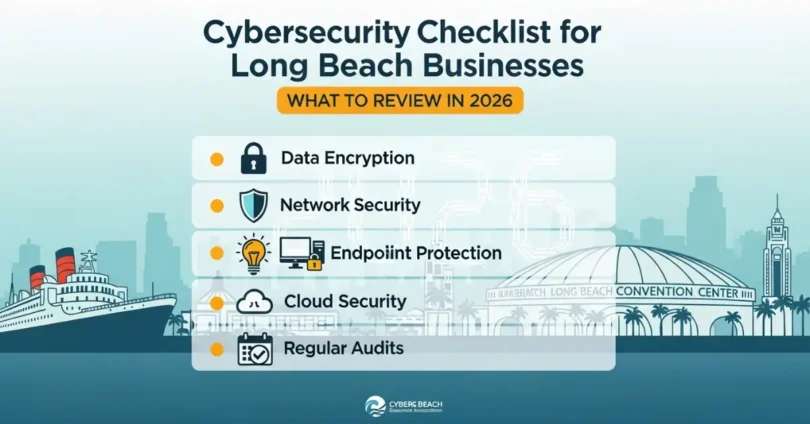
Cybersecurity has become a serious concern for businesses of all sizes. Many companies in Long Beach rely on digital tools, online communication, and cloud services to manage daily work. These tools help businesses operate smoothly, but they also create security risks. Hackers often target small and medium businesses because they expect weaker security systems. In 2026, every business should review its cybersecurity strategy carefully. A clear checklist helps companies identify weak areas, protect sensitive data, and prevent costly cyberattacks.
Business owners do not need complicated security systems to stay safe. They simply need strong practices, regular reviews, and proper protection tools. This cybersecurity checklist explains the most important areas Long Beach businesses should review to protect their systems, employees, and customer data.
Review Your Password Security
Strong password practices protect business systems from unauthorized access. Many cyberattacks begin with stolen or weak passwords. When employees use simple passwords, hackers can easily break into accounts and move through company systems. Businesses in Long Beach should review password policies regularly. Strong password rules reduce the chances of cyber criminals accessing sensitive information.
Use Strong Password Rules
Businesses should require strong passwords for every employee account. Passwords should contain at least twelve characters and include letters, numbers, and symbols. Employees should avoid using personal information such as birthdays or simple number patterns. Companies should also require password changes every few months. Strong password rules reduce the risk of hackers guessing login details and entering business systems without permission.
Use a Password Manager
Password managers help employees store and organize passwords safely. Instead of writing passwords on paper or saving them in browsers, workers can store them in a secure password manager. These tools also generate strong passwords automatically. Businesses benefit from password managers because employees no longer reuse weak passwords across multiple systems, which lowers the chances of unauthorized access.
Enable Multi-Factor Authentication
Multi-Factor Authentication adds an extra security step during login. It requires users to verify their identity using a second method, such as a phone code or authentication app. Even if hackers steal passwords, they cannot access accounts without the second verification step. Businesses in Long Beach should activate MFA on important systems to improve account protection.
Protect Email and Cloud Accounts
Email and cloud platforms store sensitive business data. If attackers gain access to these accounts, they can steal files, send phishing emails, or reset other passwords. Enabling multi-factor authentication protects these systems by requiring an additional login code. This simple step prevents many account breaches and strengthens the security of business communication tools.
Secure Remote Access Systems
Many employees now work remotely or access company systems from outside the office. Remote login systems can become easy targets for attackers. Businesses should require MFA for all remote connections, VPN access, and administrative logins. This extra protection ensures that only authorized employees can connect to company systems from external locations.
Check Software Updates and Patch Management
Outdated software often creates security weaknesses that hackers can exploit. Many cyberattacks target systems that have not received security updates. Businesses must regularly update their software and operating systems to fix these vulnerabilities. Long Beach businesses should include software updates in their cybersecurity checklist for 2026.
Update Operating Systems and Applications
Computers, servers, and mobile devices rely on operating systems and applications that require regular updates. These updates often contain important security fixes. Businesses should install updates as soon as they become available. Automatic updates help ensure that systems remain protected without requiring manual action from employees.
Replace Unsupported Software
Some older software programs stop receiving updates from developers. When this happens, security risks increase because hackers can exploit known weaknesses. Businesses should identify unsupported software and replace it with modern solutions that receive regular security updates. This step improves overall system protection and reduces cyber risk.
Review Network Security Settings
A company network connects computers, servers, printers, and other devices. If the network is not properly secured, attackers may enter the system and access important data. Businesses must review their network configuration to prevent unauthorized access. Strong network security protects both office systems and remote workers.
Secure Business Wi-Fi Networks
Wireless networks should use strong encryption and secure passwords. Businesses should avoid using default router settings because attackers often know these default credentials. Changing router passwords and enabling strong encryption methods improves protection. Companies should also separate guest Wi-Fi networks from internal business networks to prevent unauthorized access.
Monitor Network Activity
Monitoring network traffic helps businesses detect suspicious behavior. Security tools can alert administrators when unusual activity occurs, such as large data transfers or unknown devices connecting to the network. Early detection helps companies respond quickly to possible security threats before they cause serious damage.
Improve Employee Cybersecurity Awareness
Employees play a major role in cybersecurity. Many cyberattacks begin with phishing emails or deceptive messages that trick employees into clicking harmful links. Training employees to recognize these threats greatly reduces security risks. Long Beach businesses should include cybersecurity awareness training as part of their security strategy.
Teach Employees to Recognize Phishing
Phishing emails often look like normal business messages. Attackers may pretend to be managers, customers, or service providers. Employees should learn how to identify suspicious links, unexpected attachments, and unusual requests for passwords or payments. When employees understand these warning signs, they can avoid many common cyberattacks.
Create a Security Reporting Process
Businesses should encourage employees to report suspicious activity immediately. Workers should know whom to contact if they receive strange emails or notice unusual system behavior. A simple reporting process helps companies investigate potential threats quickly and prevent larger security problems.
Review Data Backup Systems
Data backups protect businesses from data loss caused by cyberattacks, hardware failures, or human errors. If a company loses important data, backups allow quick recovery and reduce downtime. Long Beach businesses should test and review their backup systems regularly to ensure reliable protection.
Schedule Regular Data Backups
Businesses should back up important files on a daily or weekly schedule depending on their operations. Automatic backups help ensure that recent data remains available if systems fail. Backup systems should include financial records, customer information, and important operational files.
Store Backups Securely
Backup copies should remain stored in secure locations. Many businesses use cloud backup services along with offline storage for additional protection. Keeping multiple backup copies ensures that data remains available even if one backup location becomes compromised.
Check Endpoint Security
Endpoint devices include laptops, smartphones, desktops, and tablets that connect to business systems. These devices often store sensitive information, making them attractive targets for attackers. Businesses should secure every device that connects to company networks.
Install Security Software
Antivirus and endpoint protection tools help detect malware and suspicious behavior. Businesses should install security software on all company devices and keep it updated regularly. These tools scan files, block harmful downloads, and prevent unauthorized programs from running on business systems.
Protect Lost or Stolen Devices
Employees sometimes travel with laptops or mobile devices. If these devices become lost or stolen, business data may become exposed. Device encryption and remote locking features help protect information. Businesses should enable these features to prevent unauthorized access if devices go missing.
Why Long Beach Businesses Should Work with Consilien
Managing cybersecurity can become difficult for small and medium businesses. Many companies do not have a full internal IT team to monitor security systems and respond to threats. Professional IT support can help businesses maintain strong protection and identify security risks early. Consilien provides reliable IT and cybersecurity support for businesses in Long Beach. The company helps organizations review security systems, monitor networks, protect sensitive data, and maintain secure backup solutions. Consilien also assists businesses with cybersecurity assessments and employee training. With expert guidance, companies can strengthen their security systems and reduce the risk of data breaches and cyberattacks in 2026.
Conclusion
Cybersecurity is essential for every modern business. Long Beach companies rely on digital systems to store data, communicate with customers, and manage operations. Without proper security measures, these systems can become targets for cyber criminals. A clear cybersecurity checklist helps businesses stay organized and proactive. Consilien helps Long Beach businesses maintain secure systems and respond to security challenges effectively. By following this checklist and working with experienced professionals, businesses can protect their operations and maintain strong cybersecurity in 2026.